
Creating content for social media can take a lot of time.
You need ideas, captions, visuals, short videos, quotes, and enough content to stay consistent across different platforms. For many creators and marketers, that can quickly become overwhelming.
That is why more people are using AI YouTube video summarizers.
Instead of watching an entire 30-minute or 1-hour video and manually taking notes, an AI summarizer can instantly pull out the most important points, quotes, and ideas. You can then turn those insights into posts for Instagram, TikTok, X, LinkedIn, Pinterest, Facebook, and more.
If you want to create more content in less time, this can be one of the easiest ways to improve your workflow.
What Is an AI YouTube Video Summarizer?
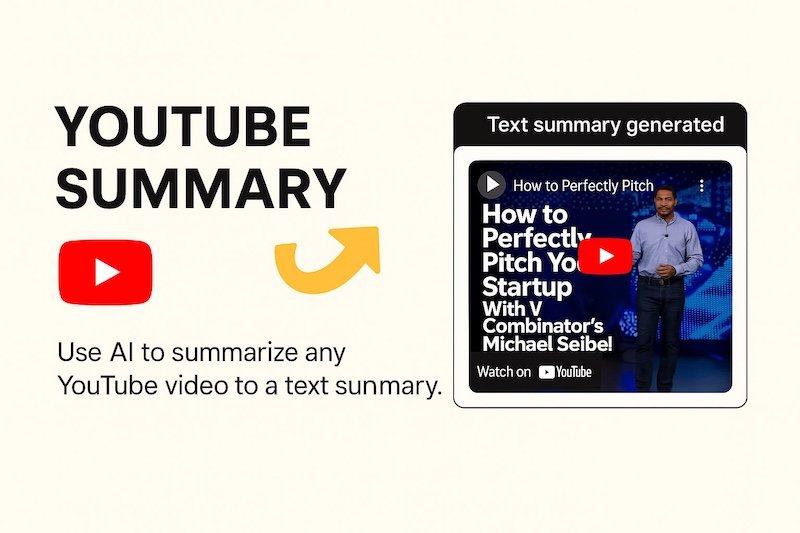
An AI YouTube video summarizer is a tool that uses artificial intelligence to analyze YouTube videos and generate a short summary of the content.
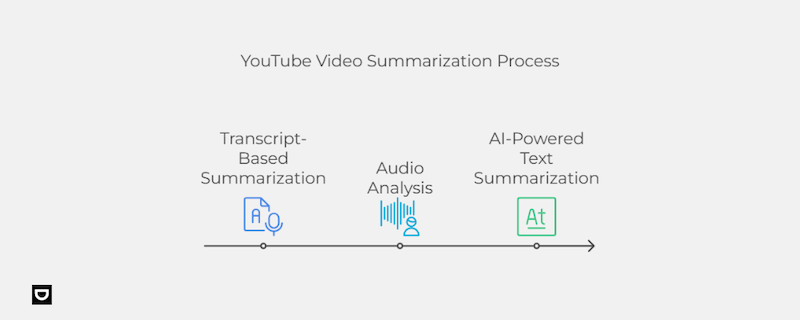
Instead of watching the full video, you get:
- Key points
- Main ideas
- Important quotes
- Highlights and takeaways
- Timestamped sections
Many tools can also generate different summary styles, such as bullet points, blog outlines, social media captions, or detailed notes.
This makes it much easier to turn long-form video content into short-form content for social media.
Why Use AI Video Summaries for Social Media?
Social media content performs best when it is short, clear, and easy to consume.
Most people do not have time to watch a full webinar, podcast, interview, or tutorial. But they are willing to read a quick post, swipe through a carousel, or watch a short clip with the most interesting insights.
AI video summarizers help you quickly turn one long video into multiple pieces of content.
For example, one YouTube video can become:
- A LinkedIn post with key takeaways
- An Instagram carousel with main points
- A TikTok script based on an interesting fact
- A Twitter thread summarizing the topic
- A Pinterest infographic
- A Facebook post with a quote or statistic
- A short email newsletter
This allows you to create much more content without constantly starting from scratch.
Benefits of Using an AI YouTube Video Summarizer
Save Time
One of the biggest advantages is speed.
Instead of spending an hour watching a video and another hour creating content, AI can summarize the key ideas in just a few seconds.
This is especially useful if you are working with multiple videos every week.
Improve Productivity
AI summarizers make it easier to process more content in less time.
You can review several videos, identify trends, and create social media content much faster than doing everything manually.
Stay Consistent
Consistency is important on social media, but it can be difficult to post regularly when you are always running out of ideas.
With AI-generated summaries, you can quickly build a backlog of content and maintain a more consistent posting schedule.
Make Content More Accessible
Not everyone wants to watch a long video.
Summaries make information easier to consume, especially for busy users, non-native speakers, or people who prefer short-form content.
How to Choose the Right AI YouTube Summarizer
There are many tools available, so it is important to choose one that fits your workflow.
Here are a few features to look for:
Accuracy
The best tools provide clear and reliable summaries without missing important context.
Ease of Use
Choose a tool with a simple interface that lets you paste a YouTube link and get results quickly.
Multiple Summary Formats
It is useful if the tool can generate:
- Bullet points
- Detailed summaries
- Quotes
- Social media captions
- Timestamped highlights
- Language Support
If you work with multilingual content, look for a tool that supports multiple languages.
Export Options
Good tools allow you to copy, download, or export the summary directly into your content workflow.
If you want all of these features in one place, UnovidAI YouTube Video Summarizer is a strong option because it supports different summary styles, timestamps, and multiple languages.
Step-by-Step: How to Turn YouTube Videos Into Social Media Content
1. Choose the Right Video
Start by selecting a YouTube video that is relevant to your audience.
This could be:
- A trending video in your niche
- A podcast interview
- A webinar
- A tutorial
- A competitor’s content
- One of your own YouTube videos
The more useful the original content is, the easier it will be to create engaging social media posts.
2. Paste the Video Into the Summarizer
Copy the YouTube URL and paste it into your AI summarizer.
Within seconds, you should receive a summary that includes the main ideas, key quotes, and highlights from the video.
3. Review and Edit the Summary
AI is fast, but it is not perfect.
Take a few minutes to review the summary and make sure everything is accurate.
You may want to:
- Correct any mistakes
- Add context
- Remove less important points
- Adjust the tone to match your brand voice
This step helps the final content feel more natural and authentic.
4. Break the Summary Into Smaller Pieces
Once you have the summary, divide it into smaller content ideas.
For example:
- Key takeaways
- Interesting statistics
- Short quotes
- Actionable tips
- Questions for your audience
This makes it easier to create multiple posts from a single video.
5. Choose Your Content Format
Different types of content work better on different platforms.
You can turn the summary into:
- A text post for LinkedIn or Facebook
- An Instagram carousel
- A Twitter thread
- A TikTok script
- A Pinterest infographic
- A short caption for Instagram Reels or YouTube Shorts
Repurposing content this way helps you get much more value from one video.
6. Add Your Own Perspective
Do not just copy and paste the AI summary.
The most successful content includes your own thoughts, opinions, and experiences.
You can:
- Share whether you agree or disagree
- Add examples from your own experience
- Ask your audience a question
- Mention how the idea applies to your niche
This helps your content feel more original and engaging.
7. Schedule and Publish
Once your content is ready, use a scheduling tool to plan your posts in advance.
This helps you stay consistent and avoid the pressure of creating content every day.
Tips for Better Results
Use Multiple Sources
Do not rely on just one YouTube channel.
Mix content from different creators to keep your posts interesting and varied.
Focus on Trending Topics
Summarizing popular or trending videos can help you stay relevant and increase engagement.
Credit the Original Creator
Always mention or tag the original source when appropriate.
This is both ethical and useful for building relationships in your niche.
Track What Performs Best
Pay attention to which types of posts get the most clicks, comments, and shares.
You can then create more content in the formats your audience enjoys most.
Combine AI Tools
You can pair video summarizers with other AI tools like:
- AI caption generators
- Image creation tools
- Video editing tools
- Writing assistants
This can make your entire content creation process much faster.
Final Thoughts
AI YouTube video summarizers are one of the easiest ways to create more social media content in less time.
Instead of spending hours watching long videos and taking notes, you can instantly extract the best insights and turn them into posts for multiple platforms.
The key is to use AI as a starting point.
Your ideas, opinions, and creativity are still what make the content unique. AI simply helps you work faster and stay consistent.